Introduction
AI photo editing has changed the way people create and share photos online. You no longer need advanced Photoshop skills to try a new style, change a background, create a cinematic portrait, or give an ordinary picture a completely different mood. The most important part of an AI photo edit is often the prompt. A well-written prompt gives the AI clear instructions about the subject, background, lighting, clothing, mood, camera style, and overall appearance.
This page is created as a growing collection of viral and trending AI photo editing prompts for 2026. Instead of looking for different prompts across multiple pages, you can explore different styles from one place. You will find prompts for boys, girls, couples, Instagram profile pictures, cinematic portraits, traditional looks, luxury photos, retro styles, rainy scenes, travel photos, and many other ideas. The prompts are written so that you can copy them, add your own preferences, and use them with a compatible AI image editing tool.
What Are AI Photo Editing Prompts?
AI photo editing prompts are simple instructions that tell an AI image tool how you want your photo to look after editing. You can use a prompt to describe things such as the background, lighting, clothing, mood, pose, colors, or overall photography style.
For example, if you have a normal portrait and want to give it a cinematic look, you can describe the type of lighting, background, camera effect, and mood you want. The AI then uses those instructions along with your uploaded photo to create a new version. The good thing about prompts is that you don’t need to know professional photo-editing software to experiment with different styles. You can start with a basic idea and change a few details until you get a result that suits you.
For the most natural-looking edits, it is also helpful to clearly mention which parts of the original photo should remain unchanged, especially the person’s face and other important details. In this guide, you’ll find different types of AI photo editing prompts that you can try with your own photos. You can use them as they are or adjust the details to create a style that matches your idea.
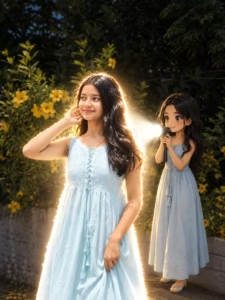
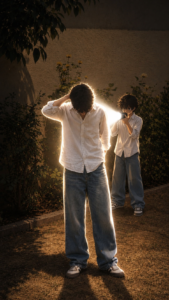
Trending Prompts ⬇️
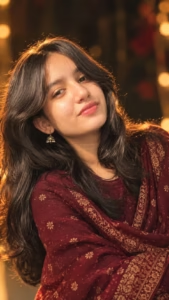
How To Create Ai Photo
I’m going to explain the complete process of creating photos with AI step by step. By following these simple instructions, you can easily give your photos a unique look with the help of AI.
Step 1: Download ChatGPT
First, download the ChatGPT app from the Google Play Store and sign in using your Gmail account.
Step 2: Choose a Prompt
Scroll through the post and choose the prompt for the photo style you like. Copy the complete prompt.
Step 3: Upload Your Photo
Open ChatGPT and upload your own photo. For better results, use a clear and good-quality reference photo.
Step 4: Add the Prompt
Paste the copied prompt along with your uploaded photo and tap the Send button.
Step 5: Generate Your Photo
ChatGPT will process your photo and prompt and generate a new AI-edited image based on the instructions.
Once the image is ready, you can save it to your device. You can repeat the same process with different prompts to create more AI photos in different styles.
Create Your Image
How to Get More Realistic AI Photo Results
- Getting a realistic AI photo is not only about using a long prompt. The reference photo and the instructions you give to the AI also make a big difference.
- Start with a clear, good-quality photo where the face and important details are easy to see. Then describe the changes you actually want instead of adding too many unrelated instructions.
- If you want to keep the same person, clearly ask the AI to preserve the original facial features, hairstyle, skin tone, and natural proportions. You can also mention realistic lighting, natural skin texture, accurate shadows, and authentic camera photography.
- It is usually better to make one main change at a time. For example, if you want to change only the background, tell the AI to keep the person and clothing unchanged. This can help avoid unwanted changes to the original photo.
- If the first result does not look right, don’t worry. Try adjusting the lighting, background, pose, or camera style and generate another version. Small changes in the prompt can sometimes make a noticeable difference.
Why Identity Preservation Matters
One common problem with AI photo editing is that the generated person may look noticeably different from the original photograph.
This can happen when the prompt focuses heavily on style while giving little instruction about the original subject.
If you want to keep the same person, your prompt can clearly state that the uploaded image should be used as the identity reference. You can also mention important features such as facial structure, hairstyle, skin tone, facial hair, and natural proportions.
However, no prompt can guarantee perfect identity preservation in every AI image tool. Results depend on the tool, reference image, model, and editing instructions.
Frequently Asked Questions
What are the best AI photo editing prompts?
The useful prompt depends on the type of image you want to create. Cinematic, aesthetic, couple, traditional, professional, retro, travel, and social-media portrait prompts can all be useful for different purposes.
Can I use these prompts with my own photos?
Yes. Most of the prompts on this page are written around the idea of using an uploaded photo as a reference. The exact process depends on the AI image editing tool you use.
How do I make an AI photo look realistic?
Use a clear reference photo and describe realistic lighting, natural skin texture, accurate proportions, realistic shadows, and professional photography. Avoid adding unnecessary effects.
Which prompt is suitable for an Instagram DP?
A clean portrait with a simple background generally works well for a profile picture. A 1:1 composition is also a practical choice for most profile-picture layouts.
Which aspect ratio should I use for AI photos?
For a profile picture, 1:1 is commonly useful. For portrait posts, 4:5 works well. For Reels and Stories, 9:16 is generally suitable. For website featured images and YouTube thumbnails, 16:9 is a common choice.
Why does the AI sometimes change my face?
AI image generation does not always preserve identity perfectly. The result can depend on the quality of the reference photo, the image model, and the instructions in the prompt. Adding clear identity-preservation instructions may help.
Can I modify these prompts?
Yes. These prompts are starting points. You can change the location, clothes, lighting, mood, background, camera style, or composition according to your needs.
Final Thoughts
AI photo editing is not only about applying a visual effect. A good prompt helps you communicate the exact style and atmosphere you want from your image. The collection above covers a wide range of ideas, from cinematic and aesthetic portraits to couple photos, traditional Indian looks, travel photography, professional portraits, retro styles, and social media images.
You do not need to use every instruction in every prompt. Start with one style, generate the image, and then adjust the details based on the result. We will continue adding new AI photo editing prompts and creative styles to this page so that it can serve as a single, easy-to-use collection for different photo editing ideas throughout 2026. Bookmark this page and check back for new prompt ideas and updates.