Introduction
AI photo editing has changed the way people create and share photos online. You no longer need advanced Photoshop skills to try a new style, change a background, create a cinematic portrait, or give an ordinary picture a completely different mood. The most important part of an AI photo edit is often the prompt. A well-written prompt gives the AI clear instructions about the subject, background, lighting, clothing, mood, camera style, and overall appearance.
This page is created as a growing collection of viral and trending AI photo editing prompts for 2026. Instead of looking for different prompts across multiple pages, you can explore different styles from one place. You will find prompts for boys, girls, couples, Instagram profile pictures, cinematic portraits, traditional looks, luxury photos, retro styles, rainy scenes, travel photos, and many other ideas. The prompts are written so that you can copy them, add your own preferences, and use them with a compatible AI image editing tool.
What Are AI Photo Editing Prompts?
AI photo editing prompts are simple instructions that tell an AI image tool how you want your photo to look after editing. You can use a prompt to describe things such as the background, lighting, clothing, mood, pose, colors, or overall photography style.
For example, if you have a normal portrait and want to give it a cinematic look, you can describe the type of lighting, background, camera effect, and mood you want. The AI then uses those instructions along with your uploaded photo to create a new version. The good thing about prompts is that you don’t need to know professional photo-editing software to experiment with different styles. You can start with a basic idea and change a few details until you get a result that suits you.
For the most natural-looking edits, it is also helpful to clearly mention which parts of the original photo should remain unchanged, especially the person’s face and other important details. In this guide, you’ll find different types of AI photo editing prompts that you can try with your own photos. You can use them as they are or adjust the details to create a style that matches your idea.
Trending Prompts ⬇️
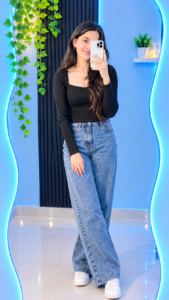
Create an ultra-realistic full-body mirror selfie of the same person shown in the uploaded reference photo, standing naturally in front of a large, uniquely shaped mirror with bright cyan-blue LED backlighting. STRICT IDENTITY LOCK: Preserve the person’s exact facial features, skin tone, hairstyle, gender, age, and identity without any changes. The person holds a white smartphone in front of their face with one hand while the other rests naturally beside their body. Preserve their original gender-appropriate outfit and personal style, with realistic clothing textures, natural folds, and suitable footwear. The setting is a modern aesthetic room with light-blue walls, glossy tiled flooring, a decorative black wall panel inside the mirror, and green hanging ivy plants in the upper-left corner. Cool blue ambient lighting creates beautiful reflections on the floor and a stylish Instagram-worthy atmosphere. Professional DSLR photography, natural body proportions, realistic skin and fabric textures, sharp focus, balanced lighting, high detail, 4K quality, complete head-to-toe composition, vertical 3:4 aspect ratio. Automatically adapt the styling to the person in the reference photo, whether boy or girl, without changing their identity, gender, natural appearance, or body structure. Avoid distorted hands, extra fingers, unrealistic reflections, artificial facial features, and blurry details.
✓ Prompt copied!
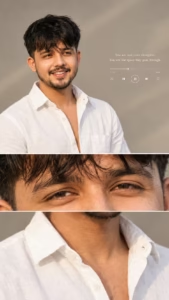
Use my uploaded photo as the ONLY identity reference. Create an ultra-realistic, high-quality aesthetic portrait of ME, preserving my exact facial identity. FACE & IDENTITY LOCK: Keep my face 100% identical to my uploaded photo. Do not change my facial structure, eyes, eyebrows, nose, lips, skin tone, facial proportions, or natural features. Maintain realistic skin texture and my original identity. Do not replace my face with another person’s face. HAIRSTYLE: Give me naturally thick, voluminous, slightly messy black hair with soft waves, a middle-part hairstyle, and a few loose strands falling naturally over my forehead. Keep the hairstyle realistic and well-textured.FACIAL HAIR: Add a natural, neatly maintained light mustache and a subtle short beard along the jawline and chin, only if it suits my original appearance. Keep everything realistic. OUTFIT: A clean, premium white button-down shirt with an open collar, slightly relaxed fit, and natural fabric folds. No tie, no unnecessary accessories. POSE & EXPRESSION: A close-up portrait with my head slightly turned to one side, looking toward the left with a calm, confident, thoughtful expression. Relaxed lips, natural eyes, and a cinematic editorial-model pose. CAMERA & COMPOSITION: Professional DSLR portrait photography, close-up framing from the chest upward, face positioned toward the left side of the frame, with sufficient clean negative space on the right. Natural perspective, sharp facial details, shallow depth of field, and a softly blurred background. BACKGROUND: Minimalist warm light-grey studio background with a subtle beige tint. Add a very faint, elegant music-player interface on the right side, featuring a thin white progress bar and small minimalist playback icons. Include a small, clean white motivational quote on the right: “You are not your thoughts, You are the space they pass through.” LIGHTING & COLOR GRADING: Soft diffused studio lighting, gentle highlights on the face, natural shadows, neutral warm tones, creamy whites, subtle contrast, and a premium editorial aesthetic. Keep the skin realistic, not plastic or excessively smooth. THREE-PANEL COLLAGE: Create a vertical 9:16 composition divided into three horizontal sections: 1. TOP PANEL: A main portrait showing my face, hairstyle, white shirt, and the minimalist background with the quote. 2. MIDDLE PANEL: An extreme close-up of my original eyes and eyebrows, preserving their exact shape, color, and identity . 3. BOTTOM PANEL: A close-up crop of my white shirt, collar, neck, and upper chest, with natural lighting and fabric details. Separate the three panels with clean, straight horizontal boundaries. Keep the collage elegant, minimal, and visually balanced. QUALITY: Photorealistic, ultra-detailed, 4K quality, professional portrait photography, realistic skin pores, natural hair strands, premium Instagram aesthetic, crisp focus, sophisticated color grading. IMPORTANT: My uploaded photo must remain the source of my identity. Do not copy another person’s face. Do not change my identity, make my face artificially handsome, enlarge my eyes, alter my nose or lips, or apply excessive beauty filters. The final result must look like a real photograph of me.
✓ Prompt copied!
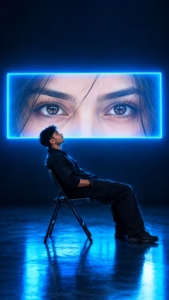
A hyper-realistic cinematic portrait of a young man with dark curly hair, wearing an all-black outfit, sitting on a black metal folding chair in a dark, empty studio. He is leaning backward in a relaxed pose, his head tilted slightly upward, gazing toward a massive horizontal rectangular screen mounted behind him. The screen displays an ultra-detailed close-up of a beautiful woman’s brown eyes, perfectly aligned and staring directly at the camera, with natural eyebrows, realistic eyelashes, and subtle strands of dark hair across her forehead. The screen emits an extremely bright white glow with intense electric cyan-blue neon edges, illuminating the man’s face, hair, shoulders, and silhouette with dramatic blue rim lighting. Deep navy-blue shadows fill the background, creating a mysterious, emotional, futuristic atmosphere. The polished dark floor reflects the cyan-blue light beneath the chair. Full-body composition, side-profile pose, subject positioned in the lower center of the frame, large glowing screen dominating the upper-middle background, wide negative space above, realistic anatomy, natural skin texture, volumetric glow, cinematic color grading, high contrast, atmospheric lighting, professional film still, ultra-photorealistic, razor-sharp details, 8K quality, vertical 9:16 aspect ratio. Preserve the exact composition and visual mood of the reference image.
✓ Prompt copied!
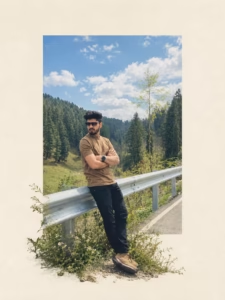
Transform the uploaded photograph into a premium minimalist editorial collage inspired by luxury travel magazines, contemporary fashion editorials, and artistic outdoor photography FORMAT & COMPOSITION: Create a strict 3:4 vertical canvas. Use a warm ivory/off-white background with subtle paper texture and generous negative space Place a large, clean-edged vertical rectangular crop of the original photograph in the center, slightly above the middle. Keep the priginal scenery recognizable inside the rectangle. Let the main subject naturally overlap and extend beyond the bottom edge of the rectangle into the ivory space. Where it looks natural, allow foreground flowers, grass, foliage, or rocks to extend beyond the frame as realistic photographic cutouts. Keep the layout asymmetrical but balanced, with the subject as the focal point. PRESERVE THE ORIGINAL: Use the uploaded photo as the source. Keep the subject as faithful to the original as possible: preserve identity, face, expression,. hair, clothing, pose, proportions, colors, and distinctive details. Do not beautify, redesign, or stylize the subject. Preserve the original landscape, lighting, textures, and atmosphere. Do not crop off important parts of the subject. STYLE: Photorealistic premium travel editorial, minimalist Swiss-inspired art direction, warm ivory paper, muted earthy colors natural greens, subtle film grain, realistic edges, and soft believable shadows dusty blues, RESTRICTIONS: No text, typography, logos, watermarks, extra subjects, unrelated objects, illustration, cartoon effects, HDR, oversaturation artificial glow, plastic textures, or exaggerated shadows. Do not distort proportions. If preserving the original subject conflicts wit the layout, prioritize the subject FINAL RESULT: A refined out of the photorealistic editorial collage with a vertical rectangular photo and the original subject or natural foreground breaking frame into the surrounding ivory negative space
✓ Prompt copied!
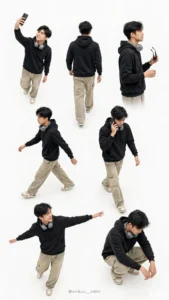
Using my uploaded photo, create an ultra-realistic, premium fashion photography collage featuring the exact same person in 8 different poses. Strictly preserve my real face, identity, hairstyle, skin tone, and natural facial features without any changes. OUTFIT: A stylish oversized slate-blue/charcoal-blue sweatshirt with subtle white lettering on the chest, cream-white cargo pants, and matching grey-and-white chunky sneakers. Add a simple black wristwatch. No cap or hat. Keep the outfit consistent across all 8 poses. POSES: 1. Standing confidently while pointing upward. 2. Full back view showing the outfit. 3. Side pose adjusting black sunglasses. 4. Walking naturally with a stylish stride. 5. Walking while talking on a smartphone. 6. Dynamic wide-leg pose with arms extended. 7. Relaxed crouching pose with elbows resting on the knees. 8. A stylish casual pose looking sideways. COMPOSITION: Arrange all 8 full-body and medium-body poses in a single seamless collage, similar to a professional fashion lookbook. Use a clean, bright white studio background with soft natural lighting, realistic shadows, accurate body proportions, and sharp clothing details. Keep every pose distinct and naturally spaced, with the entire collage clearly visible. STYLE: Photorealistic, high-resolution, premium streetwear editorial, realistic fabric texture, natural skin details, professional studio photography, clean minimalist aesthetic. IMPORTANT: The same person must appear in every pose. Preserve facial identity accurately. No extra people, no distorted hands, no duplicate poses, no unnecessary objects, no dark background, no borders, and no large text. Vertical 9:16 composition.
✓ Prompt copied!
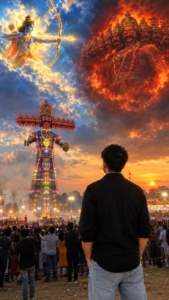
Create an ultra-realistic, cinematic 9:16 photograph using my uploaded photo as the ONLY identity reference. Preserve my exact identity, hairstyle, skin tone, and body structure. Show me from behind, wearing a plain black shirt and light blue jeans, facing a gigantic, beautifully decorated ten-headed Ravana effigy at a grand Indian Dussehra festival. In the upper-left sky, Lord Shri Ram appears among glowing blue and golden clouds, holding a radiant golden bow and arrow aimed toward Ravana. In the upper-right sky, a powerful mythological Ravana appears amid dramatic fiery red and orange clouds, with multiple heads visible. Below, the enormous illuminated Ravana effigy stands above thousands of festival spectators, colorful lights, smoke, and a beautiful sunset. Vertical 9:16 Instagram Reel composition, natural eye-level camera, full upper body and jeans visible, Ravana effigy center-left, Lord Ram upper-left, Ravana upper-right. Epic divine atmosphere, dramatic volumetric lighting, realistic clouds, rich blue and fiery orange colors, DSLR photography, natural proportions, cinematic depth, photorealistic, ultra-detailed 8K quality. Keep my face hidden, preserve my identity, and make everything look like a real photograph, not a cartoon or illustration. No text, logos, or watermarks.
✓ Prompt copied!
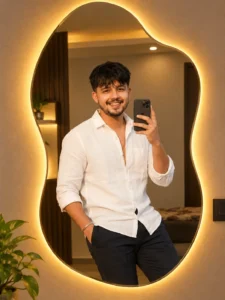
Transform the uploaded mirror selfie into a luxury LED mirror portrait.Replace the existing mitor frame with an elegant irregular organic shape mirror1,832featuring a soft warm golden LED Backlight glow around e entire edge.keep the subject same
✓ Prompt copied!
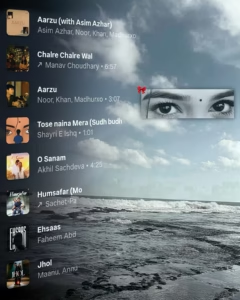
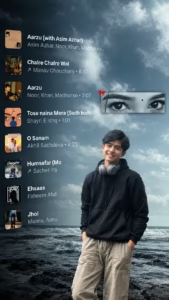
IMAGE 1 = MASTER TEMPLATE, IMAGE 2 = AUDIENCE PHOTO. Current Image 1 is the only master reference. Match its subject position, scale, framing, camera angle, perspective, depth, lighting, HD color treatment and atmosphere. Fit Image 2 naturally into the SAME position and scale; never make it unnecessarily larger. Keep Image 1’s background/environment unchanged. Apply Image 1’s color, lighting and HD visual treatment naturally to Image 2, while preserving Image 2’s real face, identity, hairstyle and original clothing design/pattern. Completely remove Image 2’s old background with clean hair/clothing edges and no halo or leftover fragments. Follow Image 1’s framing: if both images are half-body, keep the final half-body; if full-body framing is required, complete missing parts naturally without forcing full-body unnecessarily. Preserve natural pose and anatomy. Match ground contact, shadows, perspective and depth so the person looks genuinely photographed there. Preserve all text visible in Image 1 exactly as shown; do not remove, erase, alter or omit any existing text. If Image 1 contains no text, do not create or add any new text yourself. Use current Image 1 only—never carry colors/styles from previous images. DSLR-quality, realistic 8K, exact 4:5. Self-check position, scale, framing, identity, color, background and realism; fix errors before final output.
✓ Prompt copied!
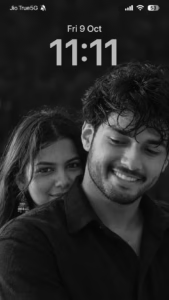
Create an ultra-realistic black-and-white iPhone lock-screen screenshot in an exact 9:16 vertical ratio (1080×1920). Use the uploaded boy’s and girl’s photos as facial identity references, preserving their recognizable faces, natural features, hairstyles, and skin textures. Recreate an intimate couple portrait: the man in the foreground on the right, wearing a black collared shirt, looking downward with a gentle smile. The woman stands slightly behind him on the left, with long dark hair, traditional earrings, and her lower face partly hidden behind his shoulder. Use cinematic monochrome lighting, deep blacks, silver-gray highlights, realistic skin details, and a softly blurred dark background. Add authentic iOS-style white text and icons: “Jio True5G” with a muted-bell icon at top-left, cellular signal, Wi-Fi, and 53% battery at top-right. Display “Fri 9 Oct” and a large centered “11:11” clock. No colors, notifications, borders, watermarks, or extra text.
✓ Prompt copied!
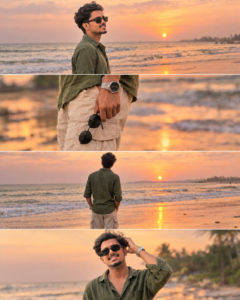
Use my uploaded photo as the exact reference, preserving my face, hairstyle, skin tone, and natural identity. Create an ultra-realistic 4-panel beach photoshoot collage with four horizontal frames separated by thin white borders. Wear an olive-green linen shirt, beige cargo pants, black sunglasses, and a silver wristwatch. Panel 1: side profile facing the ocean at sunset. Panel 2: close-up of my wristwatch and hand holding sunglasses. Panel 3: full-body back view watching the sunset. Panel 4: smiling front portrait while adjusting my hair. Add golden-orange skies, ocean waves, wet reflective sand, soft cinematic lighting, natural shadows, and blurred palm trees. Professional DSLR photography, realistic skin texture, warm color grading, 8K quality, vertical 4:5 composition, consistent appearance throughout.
✓ Prompt copied!
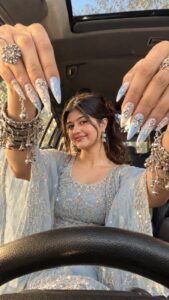
MASTER PROMPT — Ultra-Realistic Bridal Nail Art Car Selfie (9:16)</p>
<p>Use the uploaded selfie as the STRICT FACIAL IDENTITY REFERENCE. Preserve the person’s exact facial features, natural skin tone, eyes, nose, lips, face shape, age, and realistic skin texture. Do not beautify, reshape, or alter the facial identity.</p>
<p>REFERENCE COMPOSITION:</p>
<p>Create an ultra-realistic golden-hour photograph of a beautiful young South Asian woman sitting inside a car, photographed from a low dashboard-level camera angle.</p>
<p>Both hands are raised very close to the camera, framing her face symmetrically from the upper-left and upper-right corners. Her fingers point downward toward the center, making the elaborate nail extensions appear extremely large in the foreground.</p>
<p>Her face is positioned in the center between both hands, slightly below the middle of the image. Her upper body and embroidered traditional outfit remain visible beneath her face.</p>
<p>NAIL ART — MOST IMPORTANT: Extra-long, pointed almond-to-stiletto acrylic nail extensions with an intricate pastel baby-blue and milky-white design. Alternate blue and white nails with delicate blue flame patterns, silver rhinestone clusters, metallic silver bows, raised geometric diamond-shaped ornaments, tiny chrome pearls, dangling silver bells, miniature chains, and reflective teardrop charms.Every nail must have realistic three-dimensional decorations, with accurate metallic reflections and tiny sparkling highlights.</p>
<p>JEWELLERY:</p>
<p>Both wrists are heavily decorated with multiple layers of oxidized silver bangles, intricate traditional bracelets, tiny silver ghungroo bells, dangling chains, spherical metallic charms, engraved silver cuffs, and large ornamental rings. Preserve the richly layered jewellery styling.</p>
<p>OUTFIT:</p>
<p>An elegant pastel icy-blue traditional Indian embroidered outfit with intricate silver zari work, shimmering floral embroidery, sequins, tiny crystal embellishments, and delicate translucent net sleeves. Matching sheer baby-blue dupatta with densely embroidered silver floral borders, gracefully draped around the shoulders and arms.</p>
<p>HAIR & MAKEUP:</p>
<p>Natural dark brown or black hair with soft face-framing strands. Elegant traditional makeup with softly defined eyes, subtle eyeliner, natural rosy blush, nude-pink lips, and a tiny decorative bindi. Delicate silver earrings and a small nose stud.</p>
<p>EXPRESSION: A soft, confident smile while looking directly toward the camera. Relaxed, natural facial expression.</p>
<p>CAMERA & PERSPECTIVE: Shot from inside the car using a realistic smartphone wide-angle lens positioned low near the steering wheel.The black textured steering wheel curves across the entire bottom foreground. The car roof and upper windshield are visible behind the raised hands. Soft outdoor scenery is visible through the side windows.Extreme foreground perspective makes both hands and nail extensions appear much larger than the face.Keep the hands closest to the camera, face in the middle distance, and car interior in the background.</p>
<p>LIGHTING: Warm late-afternoon golden sunlight entering through the car windows, creating glowing highlights on the face, hands, silver jewellery, embroidery, and dangling nail charms.Soft cinematic shadows, realistic skin texture, subtle lens glow, natural reflections, and warm golden color grading.</p>
<p>PHOTOGRAPHY QUALITY:Photorealistic smartphone photography, realistic optical perspective, detailed skin pores, authentic fabric texture, natural hand anatomy, realistic fingers, accurately attached nail extensions, sharp metallic jewellery details, and believable depth of field.The final result must look like a genuine candid photograph, not an AI-generated image.ASPECT RATIO: 9:16 vertical portrait.NEGATIVE PROMPT:Different outfit, different nail designs, short nails, missing charms, missing bangles, extra fingers, distorted hands, unnatural anatomy, blurry face, plastic skin, excessive beauty filters, cartoon, illustration, CGI, artificial lighting, incorrect camera perspective, cropped fingertips, missing steering wheel, altered facial identity.
✓ Prompt copied!
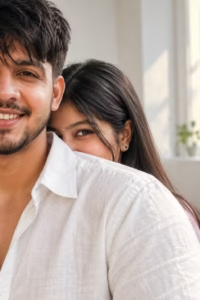
Create an ultra-realistic vertical portrait of two people in a bright, minimal indoor room with soft natural window light. A close-up over-the-shoulder composition shows the foreground person on the left wearing a light White textured linen shirt, with only part of the face visible in a cinematic crop. Behind them, the second person playfully peeks over the shoulder, revealing only one expressive eye and part of the forehead, with long straight center-parted hair. Soft diffused lighting, creamy skin tones, shallow depth of field, realistic fabric texture, natural color grading, 85mm lens, f/1.8, DSLR-quality, photorealistic, cinematic framing, elegant lifestyle aesthetic, HDR, 8K. Negative: blurry, low quality, extra limbs, duplicate people, deformed face, watermark, logo, text, CGI, cartoon, oversaturated colors.
✓ Prompt copied!
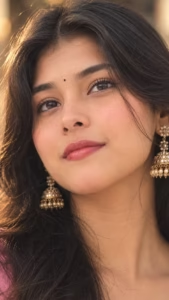
Create extreme macro close-up portrait of a woman’s face with a gentle, soft smile, looking slightly up. She has soft blush on her cheeks, glossy pink lips, subtle eyeliner, and a small black bindi on her forehead. Her hair is slightly messy. She is wearing a gold jhumka. Add motion blur and filmy grain filter. The lighting is warm aesthetic, highly detailed, photorealistic. 9:16 ratio.
✓ Prompt copied!
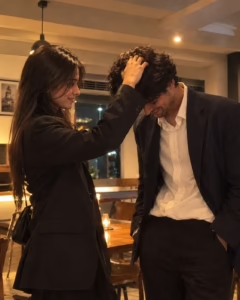
Create a realistic cinematic vertical photograph of a young couple in a cozy modern indoor setting at night. The woman is standing on the left, wearing an elegant black oversized blazer with long straight dark hair, gently placing her hand on the man’s head in a playful and affectionate gesture. She has a soft smile and is looking toward him. The man is standing on the right, slightly bending his head down with a shy, playful expression, wearing a dark navy/black oversized blazer over a slightly loose white button-up shirt with black trousers. Natural candid body language, intimate couple moment, no posing stiffness. Warm ambient ceiling light creates a soft golden glow and subtle shadows, cozy restaurant/lounge-like interior, muted beige and gray background, wooden table and chairs visible behind them, slightly grainy low-light smartphone photography aesthetic, soft focus, realistic skin texture, natural hair, cinematic warm tones, subtle motion blur, authentic candid photograph, shallow depth of field, high realism, 9:16 vertical composition.
✓ Prompt copied!
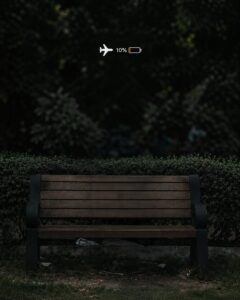
IMAGE 1 = MASTER TEMPLATE, IMAGE 2 = AUDIENCE PHOTO. Current Image 1 is the only master reference. Match its subject position, scale, framing, camera angle, perspective, depth, lighting, HD color treatment and atmosphere. Fit Image 2 naturally into the SAME position and scale; never make it unnecessarily larger. Keep Image 1’s background/environment unchanged. Preserve every visible sticker, icon, overlay or small graphic in Image 1 exactly as shown, including the airplane and battery icons; do not remove, replace, redraw, modify or reinterpret them. Apply Image 1’s color, lighting and HD visual treatment naturally to Image 2, while preserving Image 2’s real face, identity, hairstyle and original clothing design/pattern. Completely remove Image 2’s old background with clean hair/clothing edges and no halo or leftover fragments. Follow Image 1’s framing: if both images are half-body, keep the final half-body; if full-body framing is required, complete missing parts naturally without forcing full-body unnecessarily. Make the person sit in the chair exactly like the seated person in Image 1: position the pelvis and waist directly on the actual seat, with the crossed thigh naturally resting on the seat and the body weight visibly settled into the chair. The waist, hips and thighs must follow the seat position and height, creating a real seated connection with no gap, lift or floating appearance. Adjust the chair position slightly if necessary so the person naturally fits and looks physically seated. Preserve natural pose and anatomy. Match ground contact, shadows, perspective and depth so the person looks genuinely photographed there. Use current Image 1 only—never carry colors/styles from previous images. DSLR-quality, realistic 8K, exact 4:5. Self-check position, scale, framing, identity, color, background and realism; fix errors before final output.
✓ Prompt copied!
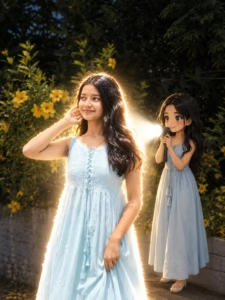
Transform the main subject into a small full-body anime/cartoon version of themselves, matching their hairstyle, outfit, accessories, colors, and recognizable details. Use the reference’s clean modern anime aesthetic, sharp linework, slightly oversized head, compact proportions, cel shading, and expressive details. Position the anime character directly behind the real subject, holding a flashlight aimed forward at their back. Create an intense realistic white beam that fully illuminates the subject from behind, producing bright rim light, glow, and natural shadows. Dim the surrounding outdoor light for dramatic contrast. Preserve the original scene, camera angle, composition, and realism.
✓ Prompt copied!
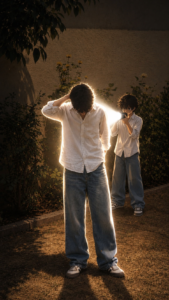
Transform the main subject into a small full-body anime/cartoon version of themselves, matching their hairstyle, outfit, accessories, colors, and recognizable details. Use the reference’s clean modern anime aesthetic, sharp linework, slightly oversized head, compact proportions, cel shading, and expressive details. Position the anime character directly behind the real subject, holding a flashlight aimed forward at their back. Create an intense realistic white beam that fully illuminates the subject from behind, producing bright rim light, glow, and natural shadows. Dim the surrounding outdoor light for dramatic contrast. Preserve the original scene, camera angle, composition, and realism.
✓ Prompt copied!
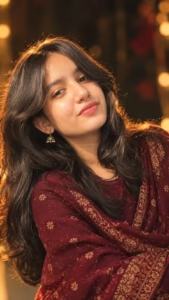
Create a highly realistic cinematic vertical 9:16 portrait using my uploaded photo as the STRICT MAIN IDENTITY REFERENCE. Preserve my exact face, facial structure, eyes, eyebrows, nose, lips, jawline, skin tone, hairstyle, age and natural skin texture. Recreate the reference image’s composition, warm festive mood, elegant traditional styling, soft smile, slightly tilted head and close-up portrait framing. Add a rich deep-maroon patterned traditional shawl draped naturally around the shoulders, with subtle golden details and realistic fabric folds. Use warm golden backlighting, glowing rim light on hair, dark blurred background, shallow depth of field, cinematic bokeh, DSLR photography, photorealistic skin, natural colors and premium editorial quality.
✓ Prompt copied!
How To Create Ai Photo
I’m going to explain the complete process of creating photos with AI step by step. By following these simple instructions, you can easily give your photos a unique look with the help of AI.
Step 1: Download ChatGPT
First, download the ChatGPT app from the Google Play Store and sign in using your Gmail account.
Step 2: Choose a Prompt
Scroll through the post and choose the prompt for the photo style you like. Copy the complete prompt.
Step 3: Upload Your Photo
Open ChatGPT and upload your own photo. For better results, use a clear and good-quality reference photo.
Step 4: Add the Prompt
Paste the copied prompt along with your uploaded photo and tap the Send button.
Step 5: Generate Your Photo
ChatGPT will process your photo and prompt and generate a new AI-edited image based on the instructions.
Once the image is ready, you can save it to your device. You can repeat the same process with different prompts to create more AI photos in different styles.
How to Get More Realistic AI Photo Results
- Getting a realistic AI photo is not only about using a long prompt. The reference photo and the instructions you give to the AI also make a big difference.
- Start with a clear, good-quality photo where the face and important details are easy to see. Then describe the changes you actually want instead of adding too many unrelated instructions.
- If you want to keep the same person, clearly ask the AI to preserve the original facial features, hairstyle, skin tone, and natural proportions. You can also mention realistic lighting, natural skin texture, accurate shadows, and authentic camera photography.
- It is usually better to make one main change at a time. For example, if you want to change only the background, tell the AI to keep the person and clothing unchanged. This can help avoid unwanted changes to the original photo.
- If the first result does not look right, don’t worry. Try adjusting the lighting, background, pose, or camera style and generate another version. Small changes in the prompt can sometimes make a noticeable difference.
Why Identity Preservation Matters
One common problem with AI photo editing is that the generated person may look noticeably different from the original photograph.
This can happen when the prompt focuses heavily on style while giving little instruction about the original subject.
If you want to keep the same person, your prompt can clearly state that the uploaded image should be used as the identity reference. You can also mention important features such as facial structure, hairstyle, skin tone, facial hair, and natural proportions.
However, no prompt can guarantee perfect identity preservation in every AI image tool. Results depend on the tool, reference image, model, and editing instructions.
Frequently Asked Questions
What are the best AI photo editing prompts?
The useful prompt depends on the type of image you want to create. Cinematic, aesthetic, couple, traditional, professional, retro, travel, and social-media portrait prompts can all be useful for different purposes.
Can I use these prompts with my own photos?
Yes. Most of the prompts on this page are written around the idea of using an uploaded photo as a reference. The exact process depends on the AI image editing tool you use.
How do I make an AI photo look realistic?
Use a clear reference photo and describe realistic lighting, natural skin texture, accurate proportions, realistic shadows, and professional photography. Avoid adding unnecessary effects.
Which prompt is suitable for an Instagram DP?
A clean portrait with a simple background generally works well for a profile picture. A 1:1 composition is also a practical choice for most profile-picture layouts.
Which aspect ratio should I use for AI photos?
For a profile picture, 1:1 is commonly useful. For portrait posts, 4:5 works well. For Reels and Stories, 9:16 is generally suitable. For website featured images and YouTube thumbnails, 16:9 is a common choice.
Why does the AI sometimes change my face?
AI image generation does not always preserve identity perfectly. The result can depend on the quality of the reference photo, the image model, and the instructions in the prompt. Adding clear identity-preservation instructions may help.
Can I modify these prompts?
Yes. These prompts are starting points. You can change the location, clothes, lighting, mood, background, camera style, or composition according to your needs.
Final Thoughts
AI photo editing is not only about applying a visual effect. A good prompt helps you communicate the exact style and atmosphere you want from your image. The collection above covers a wide range of ideas, from cinematic and aesthetic portraits to couple photos, traditional Indian looks, travel photography, professional portraits, retro styles, and social media images.
You do not need to use every instruction in every prompt. Start with one style, generate the image, and then adjust the details based on the result. We will continue adding new AI photo editing prompts and creative styles to this page so that it can serve as a single, easy-to-use collection for different photo editing ideas throughout 2026. Bookmark this page and check back for new prompt ideas and updates.